I finally decided to get a new domain (another week, another domain…), but I completely forgot how to use BIND’s inline signing to sign domains.
In order to not make the same mistake as today (forgetting things), I thought it would be a cool idea to document as I go.
First things first, in named.conf I add the zone configuration
zone "antranig.am" {
  type master;
  file "/usr/local/etc/namedb/pri/antranig.am/antranig.am.zone";
  allow-query { any; };
  allow-transfer { he; ns2; };
  inline-signing yes;
  dnssec-policy nsec3;
  key-directory "/usr/local/etc/namedb/keys/antranig.am";
};
and then create the directories which I need
# mkdir -p /usr/local/etc/namedb/pri/antranig.am /usr/local/etc/namedb/keys/antranig.am
and finally write the zone file itself
$TTL 30m
$ORIGIN antranig.am.
@   SOA   ns1.bind.am.  root.bsd.am. (
    2026110600  ; serial
    1h          ; refresh
    5m          ; retry
    1d          ; expire
    1h          ; minimum
)

    NS    ns1.bind.am.
    NS    ns2.bind.am.
    A     37.157.221.130
    AAAA  2001:470:1f15:e4::80
Finally I set the right permissions
# chown -R bind:bind /usr/local/etc/namedb/pri/antranig.am /usr/local/etc/namedb/keys/antranig.am
I can now check the BIND configuration
# named-checkconf -z >/dev/null && echo 'all good' || echo 'something went wrong'
all good
Okay, time to reload the server
# service named restart
Stopping named.
Waiting for PIDS: 56916.
Starting named.
Now I can check if DNSSEC is working
# rndc dnssec -status antranig.am
dnssec-policy: nsec3
current time:  Fri Nov  6 14:23:25 2026

key: 22548 (ECDSAP256SHA256), CSK
  published:      yes - since Fri Nov  6 13:53:12 2026
  key signing:    yes - since Fri Nov  6 13:53:12 2026
  zone signing:   yes - since Fri Nov  6 13:53:12 2026

  No rollover scheduled
  - goal:           omnipresent
  - dnskey:         rumoured
  - ds:             hidden
  - zone rrsig:     rumoured
  - key rrsig:      rumoured
Aha! the goal is omnipresent but the DS is hidden (not upstreamed), however the DNSKEY is rumoured, so I can grab it and get the DS RR from it
# drill DNSKEY antranig.am | dnssec-dsfromkey -f - antranig.am
antranig.am. IN DS 22548 13 2 A478619737C1E667800440FD892D565D9E92D0533364880CFB2544EE2E2889BF
Perfect, now I’ll publish that at AMNIC
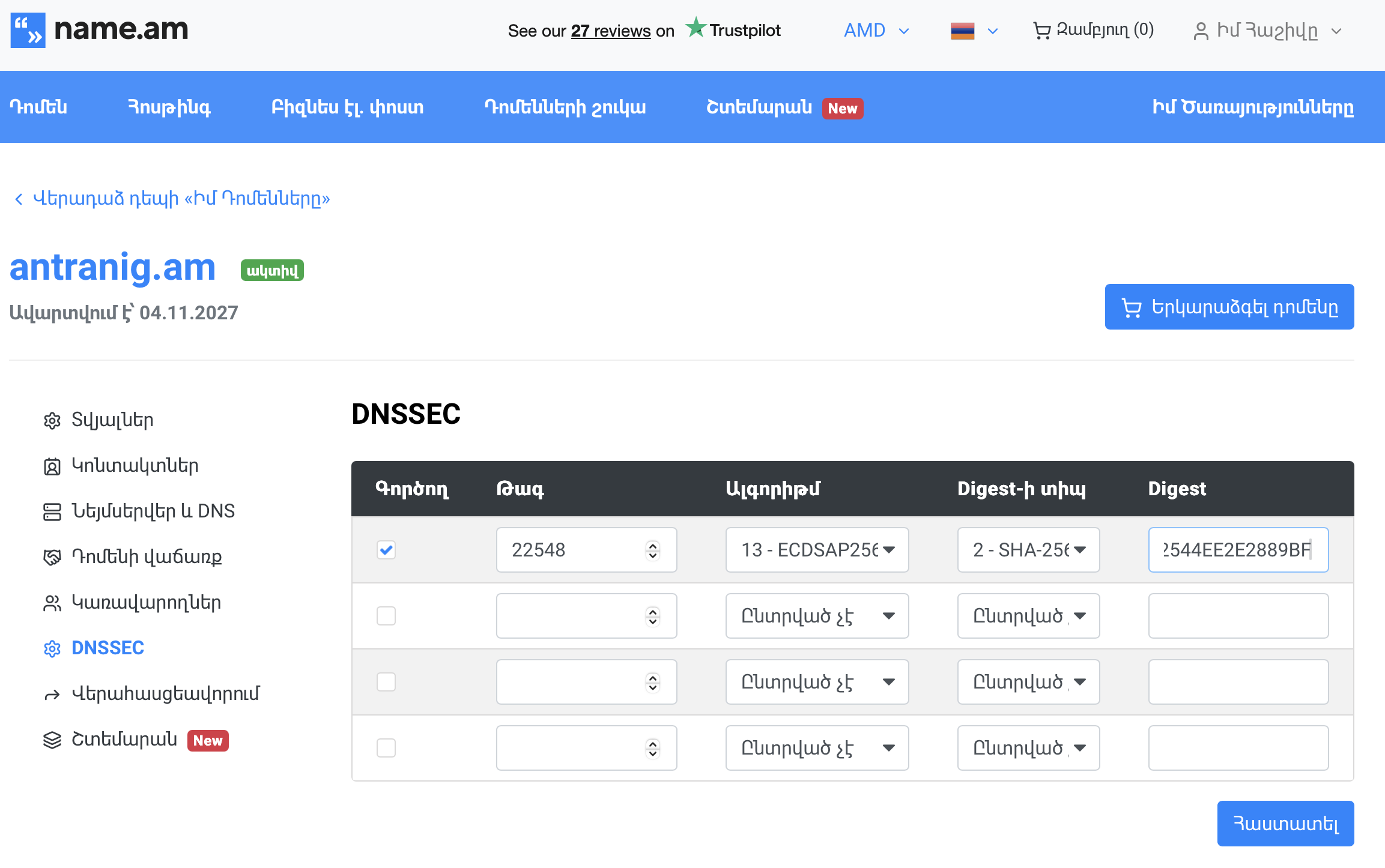
And time to check the WHOIS
   Domain name: antranig.am
   Registrar:   name (NAME LLC)
   Status:      active

   Registrant:
      Domain Privacy
      NAME.AM
      domain registration, domain marketplace, backorder, hosting etc.,  -
      AM

   Private contact:
      PRIVATE REGISTRATION
      ---------------------
      NAME.AM
      domain registration, domain marketplace, backorder, hosting etc., -
      AM
      private@name.am
      +37460660099

   DNS servers (zone signed, 1 DS record):
      ns1.bind.am
      ns2.bind.am

   Registered:    2026-11-04
   Last modified: 2026-11-06
   Expires:       2027-11-04
Good! but the WHOIS gets updated faster than the actual AM zone, so I can check that too, in ~10 minutes, when it gets updated, hopefully… I’m gonna make some tea.
I’m back!
# drill -Q @ns-pri.nic.am. DS antranig.am
22548 13 2 a478619737c1e667800440fd892d565d9e92d0533364880cfb2544ee2e2889bf
Okay, so the DS is published, let’s see if the verification is working…
# drill -S antranig.am
;; Number of trusted keys: 2
;; Chasing: antranig.am. A


DNSSEC Trust tree:
antranig.am. (A)
|---antranig.am. (DNSKEY keytag: 22548 alg: 13 flags: 257)
    |---antranig.am. (DS keytag: 22548 digest type: 2)
        |---am. (DNSKEY keytag: 62484 alg: 13 flags: 256)
            |---am. (DNSKEY keytag: 39902 alg: 13 flags: 257)
            |---am. (DS keytag: 39902 digest type: 2)
                |---. (DNSKEY keytag: 8763 alg: 8 flags: 256)
                    |---. (DNSKEY keytag: 38696 alg: 8 flags: 257)
;; Chase successful
Worked like a charm!
Now we tell BIND that the DS has been published
root@bsd:/usr/local/etc/namedb # rndc dnssec -checkds published antranig.am
Marked DS as published since 06-Nov-2026 14:34:50.000
root@bsd:/usr/local/etc/namedb # rndc dnssec -status antranig.am
dnssec-policy: nsec3
current time:  Fri Nov  6 14:34:55 2026

key: 22548 (ECDSAP256SHA256), CSK
  published:      yes - since Fri Nov  6 13:53:12 2026
  key signing:    yes - since Fri Nov  6 13:53:12 2026
  zone signing:   yes - since Fri Nov  6 13:53:12 2026

  No rollover scheduled
  - goal:           omnipresent
  - dnskey:         rumoured
  - ds:             rumoured
  - zone rrsig:     rumoured
  - key rrsig:      rumoured
Good! now I can start using my new domain 🙂
(Configuring the secondary server is outside the scope of this blog post, but if you’re here, I assume you already know how to do that 😉 )
That’s all folks…
