Tag Archives: DNS

Setting up a new zone in BIND with DNSSEC

I finally decided to get a new domain (another week, another domain…), but I completely forgot how to use BIND’s inline signing to sign domains.

In order to not make the same mistake as today (forgetting things), I thought it would be a cool idea to document as I go.

First things first, in named.conf I add the zone configuration

zone "antranig.am" {
  type master;
  file "/usr/local/etc/namedb/pri/antranig.am/antranig.am.zone";
  allow-query { any; };
  allow-transfer { he; ns2; };
  inline-signing yes;
  dnssec-policy nsec3;
  key-directory "/usr/local/etc/namedb/keys/antranig.am";
};

and then create the directories which I need

# mkdir -p /usr/local/etc/namedb/pri/antranig.am /usr/local/etc/namedb/keys/antranig.am

and finally write the zone file itself

$TTL 30m
$ORIGIN antranig.am.
@   SOA   ns1.bind.am.  root.bsd.am. (
    2026110600  ; serial
    1h          ; refresh
    5m          ; retry
    1d          ; expire
    1h          ; minimum
)

    NS    ns1.bind.am.
    NS    ns2.bind.am.
    A     37.157.221.130
    AAAA  2001:470:1f15:e4::80

Finally I set the right permissions

# chown -R bind:bind  /usr/local/etc/namedb/pri/antranig.am /usr/local/etc/namedb/keys/antranig.am

I can now check the BIND configuration

# named-checkconf -z >/dev/null && echo 'all good' || echo 'something went wrong'
all good

Okay, time to reload the server

# service named restart
Stopping named.
Waiting for PIDS: 56916.
Starting named.

Now I can check if DNSSEC is working

# rndc dnssec -status antranig.am
dnssec-policy: nsec3
current time:  Fri Nov  6 14:23:25 2026

key: 22548 (ECDSAP256SHA256), CSK
  published:      yes - since Fri Nov  6 13:53:12 2026
  key signing:    yes - since Fri Nov  6 13:53:12 2026
  zone signing:   yes - since Fri Nov  6 13:53:12 2026

  No rollover scheduled
  - goal:           omnipresent
  - dnskey:         rumoured
  - ds:             hidden
  - zone rrsig:     rumoured
  - key rrsig:      rumoured

Aha! the goal is omnipresent but the DS is hidden (not upstreamed), however the DNSKEY is rumoured, so I can grab it and get the DS RR from it

# drill DNSKEY antranig.am | dnssec-dsfromkey -f - antranig.am
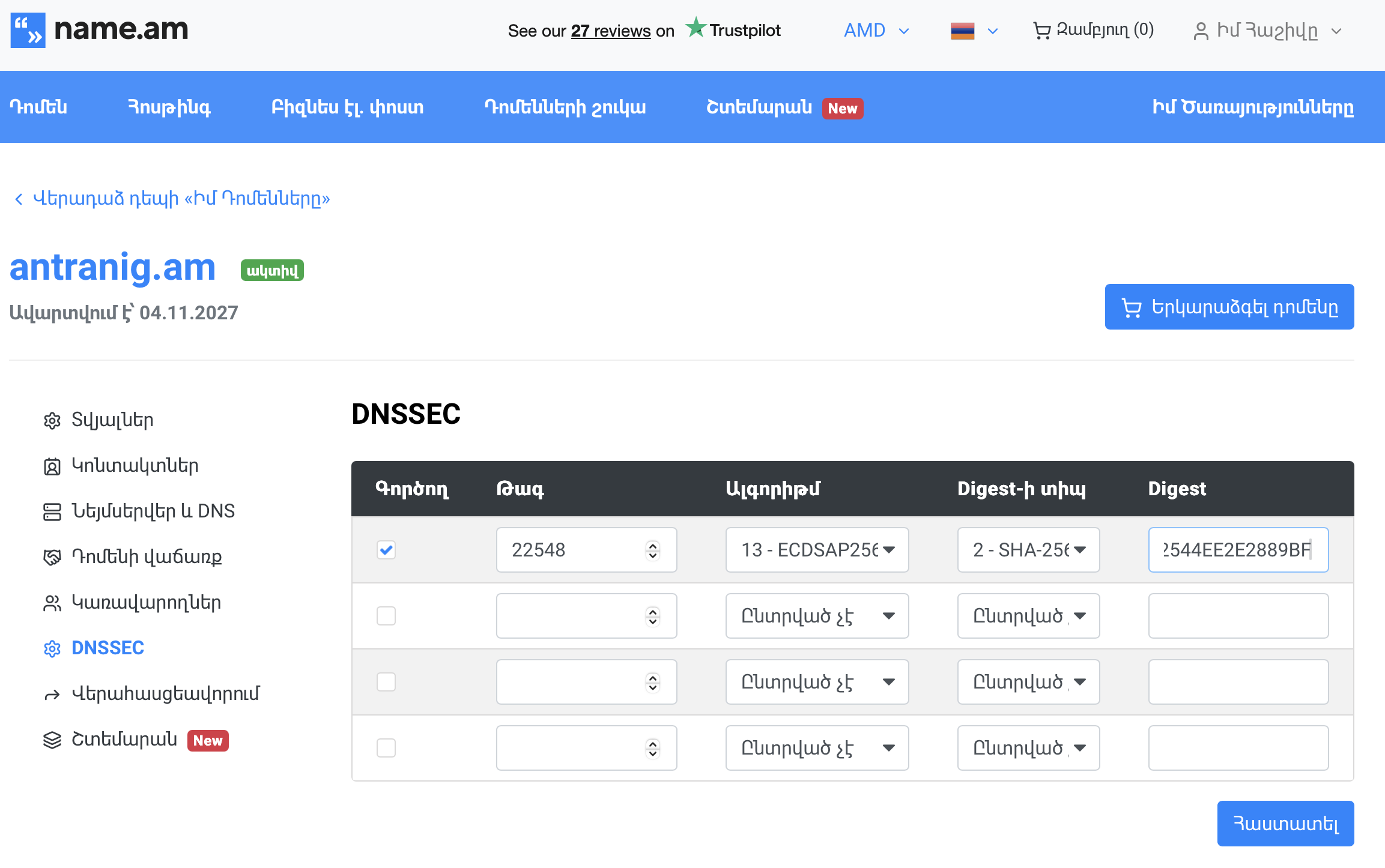
antranig.am. IN DS 22548 13 2 A478619737C1E667800440FD892D565D9E92D0533364880CFB2544EE2E2889BF

Perfect, now I’ll publish that at AMNIC
And time to check the WHOIS

   Domain name: antranig.am
   Registrar:   name (NAME LLC)
   Status:      active

   Registrant:
      Domain Privacy
      NAME.AM
      domain registration, domain marketplace, backorder, hosting etc.,  -
      AM

   Private contact:
      PRIVATE REGISTRATION
      ---------------------
      NAME.AM
      domain registration, domain marketplace, backorder, hosting etc., -
      AM
      private@name.am
      +37460660099

   DNS servers (zone signed, 1 DS record):
      ns1.bind.am
      ns2.bind.am

   Registered:    2026-11-04
   Last modified: 2026-11-06
   Expires:       2027-11-04

Good! but the WHOIS gets updated faster than the actual AM zone, so I can check that too, in ~10 minutes, when it gets updated, hopefully… I’m gonna make some tea.

I’m back!

# drill -Q @ns-pri.nic.am. DS antranig.am
22548 13 2 a478619737c1e667800440fd892d565d9e92d0533364880cfb2544ee2e2889bf

Okay, so the DS is published, let’s see if the verification is working…

# drill -S antranig.am
;; Number of trusted keys: 2
;; Chasing: antranig.am. A


DNSSEC Trust tree:
antranig.am. (A)
|---antranig.am. (DNSKEY keytag: 22548 alg: 13 flags: 257)
    |---antranig.am. (DS keytag: 22548 digest type: 2)
        |---am. (DNSKEY keytag: 62484 alg: 13 flags: 256)
            |---am. (DNSKEY keytag: 39902 alg: 13 flags: 257)
            |---am. (DS keytag: 39902 digest type: 2)
                |---. (DNSKEY keytag: 8763 alg: 8 flags: 256)
                    |---. (DNSKEY keytag: 38696 alg: 8 flags: 257)
;; Chase successful

Worked like a charm!

Now we tell BIND that the DS has been published

root@bsd:/usr/local/etc/namedb # rndc dnssec -checkds published antranig.am
Marked DS as published since 06-Nov-2026 14:34:50.000
root@bsd:/usr/local/etc/namedb # rndc dnssec -status antranig.am
dnssec-policy: nsec3
current time:  Fri Nov  6 14:34:55 2026

key: 22548 (ECDSAP256SHA256), CSK
  published:      yes - since Fri Nov  6 13:53:12 2026
  key signing:    yes - since Fri Nov  6 13:53:12 2026
  zone signing:   yes - since Fri Nov  6 13:53:12 2026

  No rollover scheduled
  - goal:           omnipresent
  - dnskey:         rumoured
  - ds:             rumoured
  - zone rrsig:     rumoured
  - key rrsig:      rumoured

Good! now I can start using my new domain 🙂

(Configuring the secondary server is outside the scope of this blog post, but if you’re here, I assume you already know how to do that 😉 )

That’s all folks…

Analyzing FreeBSD’s Package Mirror GeoDNS

One of the things that makes FreeBSD an amazing operating system is its package manager, pkg(8). Many people will keep arguing with me saying that apt or pacman is better, but pkg has some of the best features out there. Don’t even get me started on number of packages. A friend was telling me “but how can I use FreeBSD when you have 1/3rd number of packages that Debian has?”. Again, this is a lie. While Debian has 80K packages, each software is divided into -doc and -dev, while on FreeBSD a simple pkg install will install everything that a package needs.

But let’s not talk about how awesome FreeBSD’s pkg is, let’s talk about it’s issues.

Couple of years ago, I noticed that downloading from FreeBSD package mirror was veeeeeery slow. Turns out that based on GeoDNS Armenia was connecting to the South African package mirror pkg0.jinx.FreeBSD.org by default.

Lucky for me, there was a package to help you figure out which one is fastest for you, named fastest_pkg. I ran it and I learned that the Frankfurt package mirror was the fastest for me.

Initially, I changed the config in FreeBSD.conf as recommended by fastest_pkg, but I’m not a single server guy, I have dozens of hosts with hundreds of jails.

Solution? I asked the Cluster Admins to set Armenia’s GeoDNS to pkg0.fra.FreeBSD.org.

But servers come and go, and the Frankfurt server got decommissioned a while back. Luckily the project now has a server in… Sweden!

But my download speed is slow. Somehow Armenia defaulted back to South Africa.

Is this an issue for me, or is this an issue for everybody?

(Sidenote: turns out fastest_pkg has been broken for a while, ever since pkg moved to a new package format, so we also made a patch and submitted a PR)

During today’s FreeBSD “Ask the experts: AMA” we used RIPE Atlas to measure the speeds from all around the world, to all package mirror hosts.

All of the measurements can be found here.

So, here’s the goal

  • Measure from around the world to all of the package mirror hosts (done).
  • Measure from around the world to pkg.FreeBSD.org to get the default GeoDNS host for each area/country/network (in progress, recurring every 6 hours for the next 6 days)
  • Find mis-configurations between “fastest” and “default” (TODO).

While the big measurements is still running I tried to use my eyes to see if there’s anything GREEN (aka fast connection) in direct package mirror host measurements whilst being YELLOW/RED (aka bad connection) when connecting to pkg.FreeBSD.org.

Unsurprisingly, we found one! It was in Mombasa, Kenya.

Here’s what it looks like while connecting directly:

{
  "fw": 5080,
  "mver": "2.6.2",
  "lts": 25,
  "dst_name": "pkg0.jinx.freebsd.org",
  "ttr": 10639.830509,
  "af": 4,
  "dst_addr": "196.10.53.168",
  "src_addr": "160.119.216.205",
  "proto": "ICMP",
  "ttl": 59,
  "size": 1000,
  "result": [
    {
      "rtt": 47.434297
    },
    {
      "rtt": 47.39957
    },
    {
      "rtt": 47.412379
    },
    {
      "rtt": 47.369089
    },
    {
      "rtt": 47.851894
    }
  ],
  "dup": 0,
  "rcvd": 5,
  "sent": 5,
  "min": 47.369089,
  "max": 47.851894,
  "avg": 47.493445799999996,
  "msm_id": 110487154,
  "prb_id": 22215,
  "timestamp": 1750269643,
  "msm_name": "Ping",
  "from": "160.119.216.205",
  "type": "ping",
  "group_id": 110487154,
  "step": null,
  "stored_timestamp": 1750269644
}

And here it is via GeoDNS’s defaults:

{
  "fw": 5080,
  "mver": "2.6.2",
  "lts": 10,
  "dst_name": "pkg.freebsd.org",
  "ttr": 10465.87807,
  "af": 4,
  "dst_addr": "173.228.147.98",
  "src_addr": "160.119.216.205",
  "proto": "ICMP",
  "ttl": 52,
  "size": 1000,
  "result": [
    {
      "rtt": 240.19025
    },
    {
      "rtt": 244.967071
    },
    {
      "rtt": 236.466414
    },
    {
      "rtt": 238.189775
    },
    {
      "rtt": 233.570938
    }
  ],
  "dup": 0,
  "rcvd": 5,
  "sent": 5,
  "min": 233.570938,
  "max": 244.967071,
  "avg": 238.6768896,
  "msm_id": 110489920,
  "prb_id": 22215,
  "timestamp": 1750270943,
  "msm_name": "Ping",
  "from": "160.119.216.205",
  "type": "ping",
  "group_id": 110489920,
  "step": null,
  "stored_timestamp": 1750270944
}

Clearly, it’s set to pkg0.chi.freebsd.org (173.228.147.98) by default. That’s Chicago. That’s halfway around the world. It took it 238ms on average. While it took the same probe 47ms on average when connecting to pkg0.jinx.freebsd.org directly.

Clearly, I’m not the only one.

Hopefully after collecting data for 6 days, we can start analyzing and improving the GeoDNS setup that we have.

A good suggestion from crest was to have a pkg plugin that does the work of fastest_pkg on the fly. We’ll try that one day.

If anyone is interested in helping me out, feel free to contact me over email, IRC or Discord.

That’s all folks…

Generating SSHFP Records

I added a new server to our hackerspace last week. This new server will be used for research in security. When I was adding the new DNS record when I realized that the previous server had a SSHFP record as well!

I remember that I should use the ssh-keygen command, however, like a normal human being, I forgot which flag to use. A simple search in the manual page says that I should use -r flag, so here we go.

antranigv@srv0:~ % ssh-keygen -r srv0
srv0 IN SSHFP 1 1 785b3fa04870e92bf25f4c7f7092733acf586ffb
srv0 IN SSHFP 1 2 847fd4a76ef7dfcef31ac3fa18c139413ab0017fa17014b3884bff161c3364de
srv0 IN SSHFP 3 1 8268aa7b8dccf4c0e7881472c72093589ca46b2e
srv0 IN SSHFP 3 2 ea0c9f0a50a825f5a0a59cebf8637876970a34000e6e0afd46bf269e08294a88
srv0 IN SSHFP 4 1 2fbe9d0e2ecdbd9dd58576e4683ee70858ca3f25
srv0 IN SSHFP 4 2 a34643bdce1ef3042cdd76fb7e46fcaf108dc436f8fcdb55daf993a27da0654b

All I need to do is to add these into the DNS zone. Luckily I run BIND, so I copy-pastad them into the file, did +1 to the SOA’s serial and done!

Now I can try logging in.

antranigv@zvartnots:~ $ ssh srv0.hackerspace.am -v
OpenSSH_9.3p1, OpenSSL 3.1.3 19 Sep 2023
debug1: Reading configuration data /Users/antranigv/.ssh/config
debug1: Reading configuration data /Users/antranigv/.ssh/personal
[…]
debug1: Server host key: ssh-ed25519 SHA256:OCsizTimnJi1grbxSY5LpvpLozfZ2pk+4Jzwg60WKYA debug1: found 6 secure fingerprints in DNS debug1: verify_host_key_dns: matched SSHFP type 4 fptype 1 debug1: verify_host_key_dns: matched SSHFP type 4 fptype 2 debug1: matching host key fingerprint found in DNS

and I logged in properly!

Antranig Vartanian

March 28, 2023

I’m sure at this point everyone heard that GitHub updated their RSA SSH host key.

This is a common issue, say you re-installed a server at the same IP/hostname. No problem, you remove a line and put in another one.

But honestly, I thought that GitHub had SSHFP records in their DNS.

$ dig SSHFP github.com +short | wc 
       0       0       0

Not so much… But then again, looks like they DO need to sign their zone first.

$ whois github.com | grep DNSSEC
   DNSSEC: unsigned
DNSSEC: unsigned

I have to say, using SSHFP has changed my life. Obviously there are some issues (Windows and macOS, specifically), but if you’re running a normal, modern operating system (hello BSDs, hello Linux) then it’s like magic!

I just setup one for our hackerspace!

$ whois hackerspace.am | grep DS
   DNS servers (zone signed, 1 DS record):
$ dig hackerspace.am SSHFP +short | wc -l
       6

Anyway, I’m sure many CI/CD pipelines are going crazy because of this… Good luck everyone!